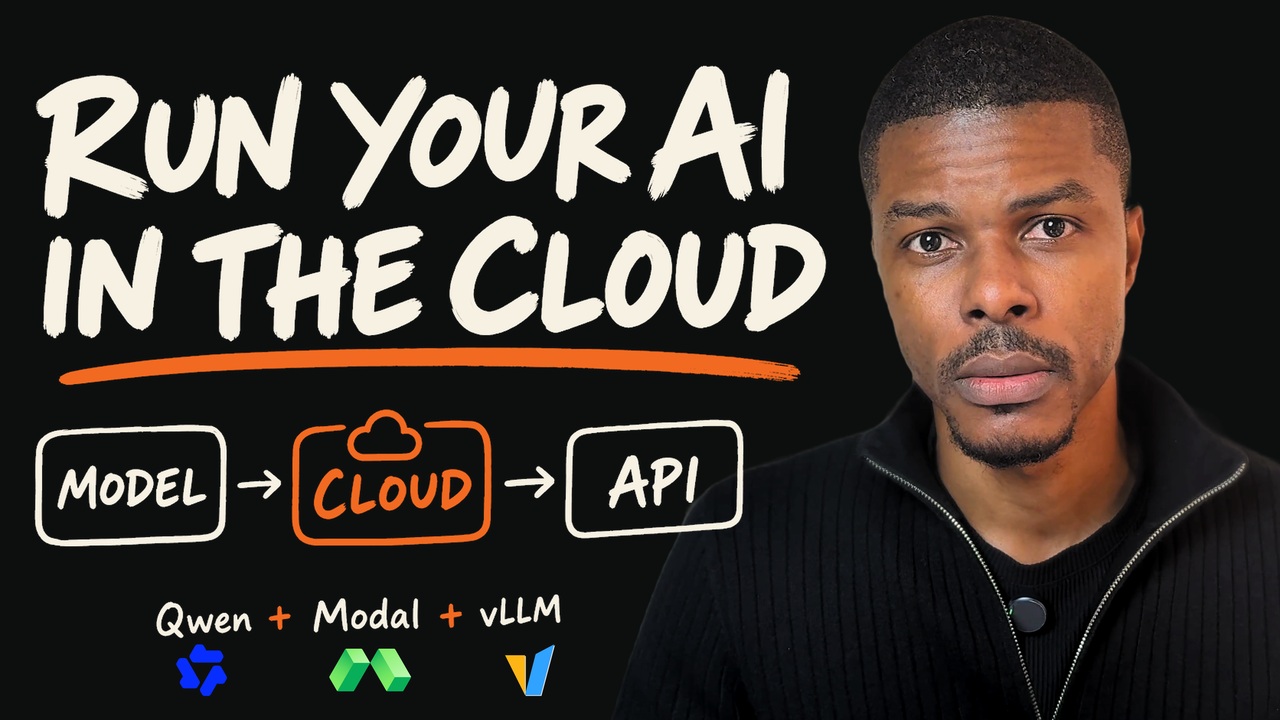
Deploy Your Own AI Model to the Cloud — Qwen + Modal + vLLM
Run Qwen locally with Unsloth, then deploy it to an NVIDIA T4 on Modal with vLLM behind an authenticated API and call it from Python — with the cold-start wait, token usage, access checks and the ten-cent bill measured on screen.
Chapters
- 0:00From an open-weight model to a cloud API
- 0:15Who this is useful for
- 1:42Local inference and cloud inference
- 2:57Model weights, inference engine, compute and API
- 6:08Load Qwen in Unsloth
- 7:35GGUF and safetensors in this demo
- 9:49Generate a local response
- 10:23Find the local API endpoint
- 11:38Build and run the Python client
- 13:27Reject an invalid local API key
- 14:55Move inference to a cloud GPU
- 16:25How Modal and vLLM fit together
- 19:30Set up Modal and authenticate
- 20:35Verify remote CPU execution
- 21:37Inspect the NVIDIA T4 GPU
- 24:07Choose the cloud model checkpoint
- 25:29Configure the Modal deployment
- 27:47Deploy the inference server
- 29:14Check readiness and track cold starts
- 31:19Call the cloud model from Python
- 33:01Read the response, token usage and timings
- 34:56Test cloud authentication
- 35:40Inspect the tutorial's compute costs
- 36:55Review the complete serving path
- 38:42Managed inference with DomainOS
Resources
The written version
The cloud model took 3.15 seconds to answer. I waited 114.99 seconds to get the result.
Both numbers describe the same request.
For 111.84 seconds, the client was waiting for the server to become ready. It checked the endpoint 14 times. Once the expected model appeared, it sent the question and received a successful response.
That difference became the most useful result of this build. A model running on a GPU is only one part of the experience an application has to deliver.
I built a small inference service to understand that experience from end to end. I started with Qwen running locally through Unsloth, called it from Python, then deployed Qwen2.5-1.5B-Instruct on a cloud T4 using Modal and vLLM. I tested the API with valid, missing and deliberately invalid credentials, and inspected the resource bill.
The captured billing rows for the tutorial added up to about ten cents.
Start with the application boundary
My first goal was simple: send a question from a Python program and receive the model's response.
A chat interface is a useful place to see whether a model loads and generates text. An application needs an address it can call, a request format, credentials, and a response it can parse.
That is the role of an inference API. Inference means using the trained model to produce an output from new input. The API makes that operation available to other software.
For this tutorial, I used an OpenAI-compatible chat-completions interface. The request contains the model name and a list of messages. The response contains generated text and token usage. “OpenAI-compatible” describes the interface; the model in this build is Qwen.
The question was deliberately ordinary:
Explain AI inference in one short paragraph.
That kept the serving experiment easy to inspect. I could focus on whether the request reached the model, whether the response returned correctly, and what happened along the way.
First, make the local path work
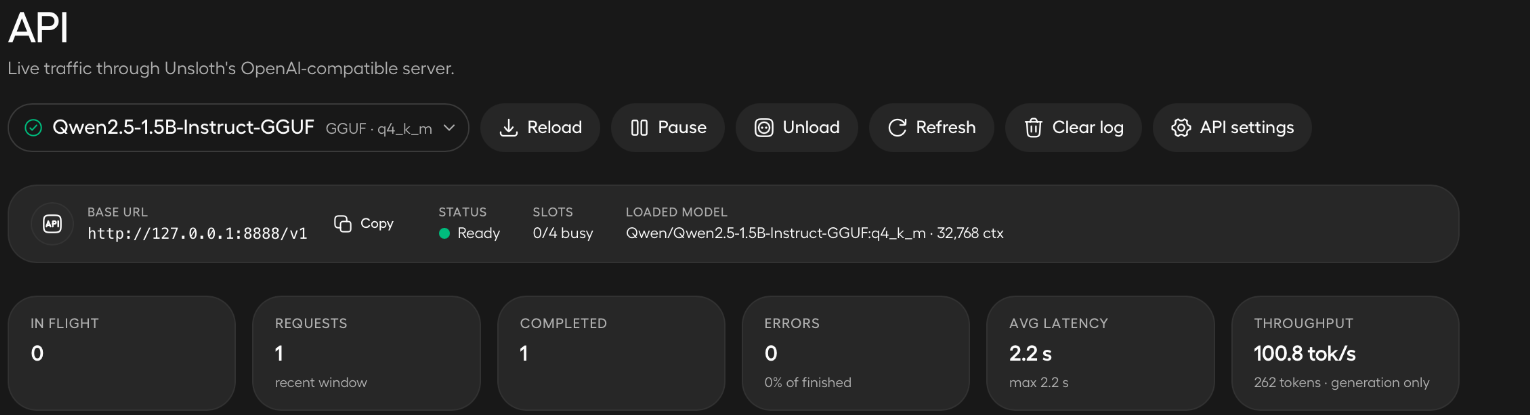
I loaded the Q4_K_M GGUF version of Qwen2.5-1.5B-Instruct in Unsloth and enabled its local API.
GGUF is the model-file format used in this local path. Q4_K_M identifies the quantized variant. Quantization reduces the precision used to represent model parameters, making a smaller local deployment practical.
The API monitor showed the loaded model, a ready server and a completed request.
The Python client runs independently of the chat interface. With the local server already running, the commands are:
export LOCAL_BASE_URL=http://127.0.0.1:8888
export LOCAL_MODEL=Qwen/Qwen2.5-1.5B-Instruct-GGUF:q4_k_m
python3 client.py
The client asks for the local API key through a hidden prompt. It sends the question, reads the response, and prints the token usage.
This is a useful first milestone because it separates the model interface from the application. Once that boundary works, I can change where inference runs while preserving the basic way the application asks for an answer.
Give each part of the cloud stack one job
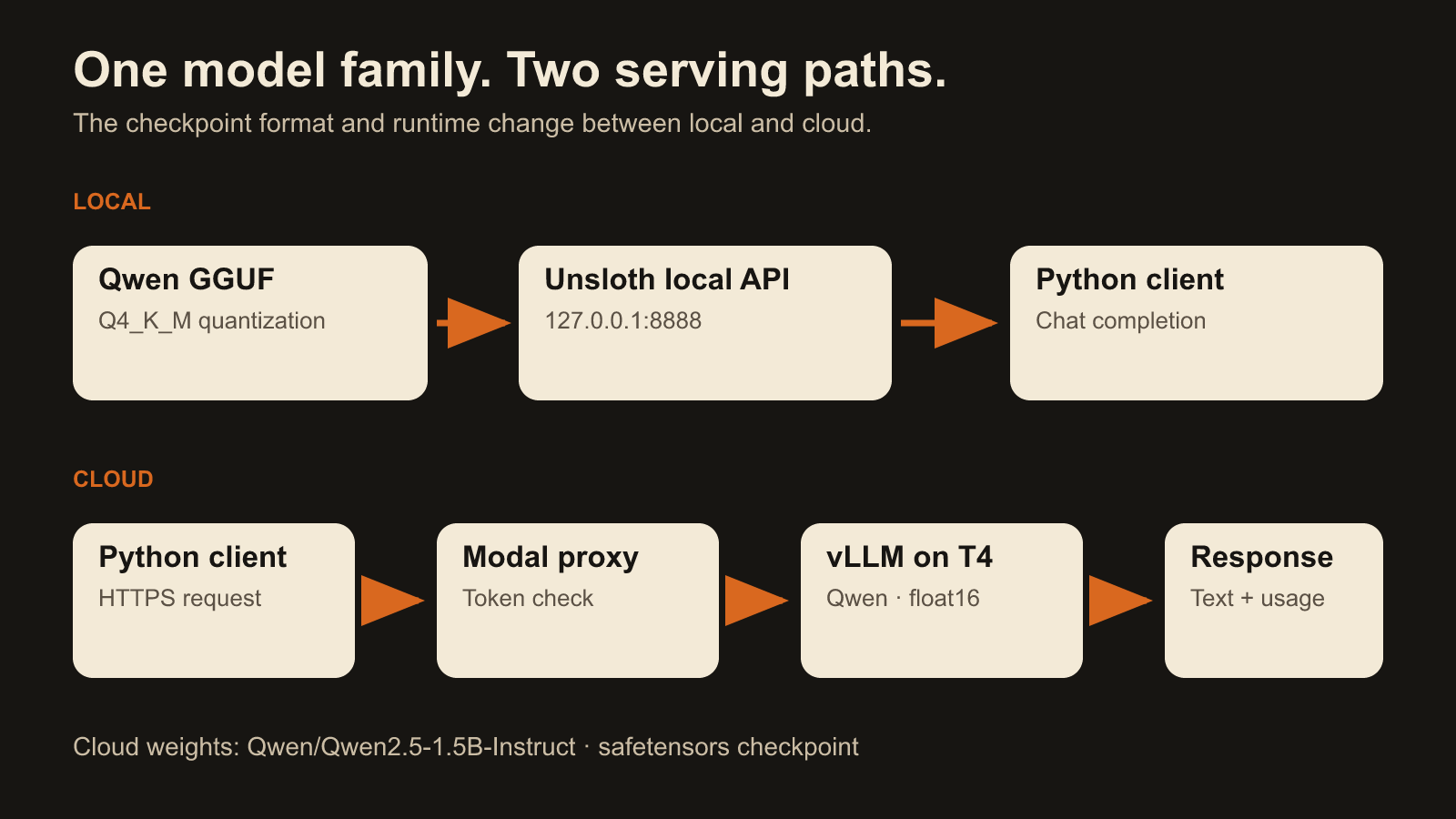
The cloud deployment uses four main components.
Qwen provides the model weights. I selected Qwen/Qwen2.5-1.5B-Instruct, an instruction-tuned checkpoint available on Hugging Face.
vLLM loads and serves the model. It runs the inference engine and exposes the chat-completions API.
Modal provides the remote environment. It runs the container on an NVIDIA T4, mounts the model cache, exposes the server over HTTPS, and checks the proxy credentials.
The Python client drives the request. It supplies credentials, checks readiness, sends the question and reports the result.
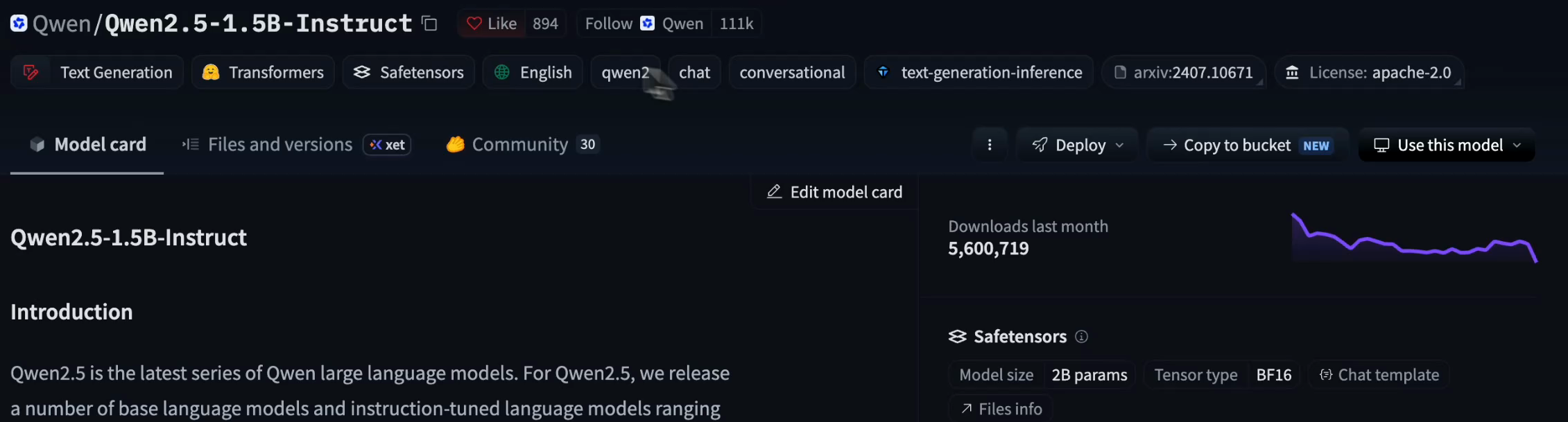
The local and cloud paths use the same model family, but different artifacts and runtimes. Locally, I used the quantized GGUF file through Unsloth. In the cloud, vLLM loaded the Hugging Face checkpoint and served it in float16. I did not upload the local GGUF file to this server.
Verify the compute before loading the model
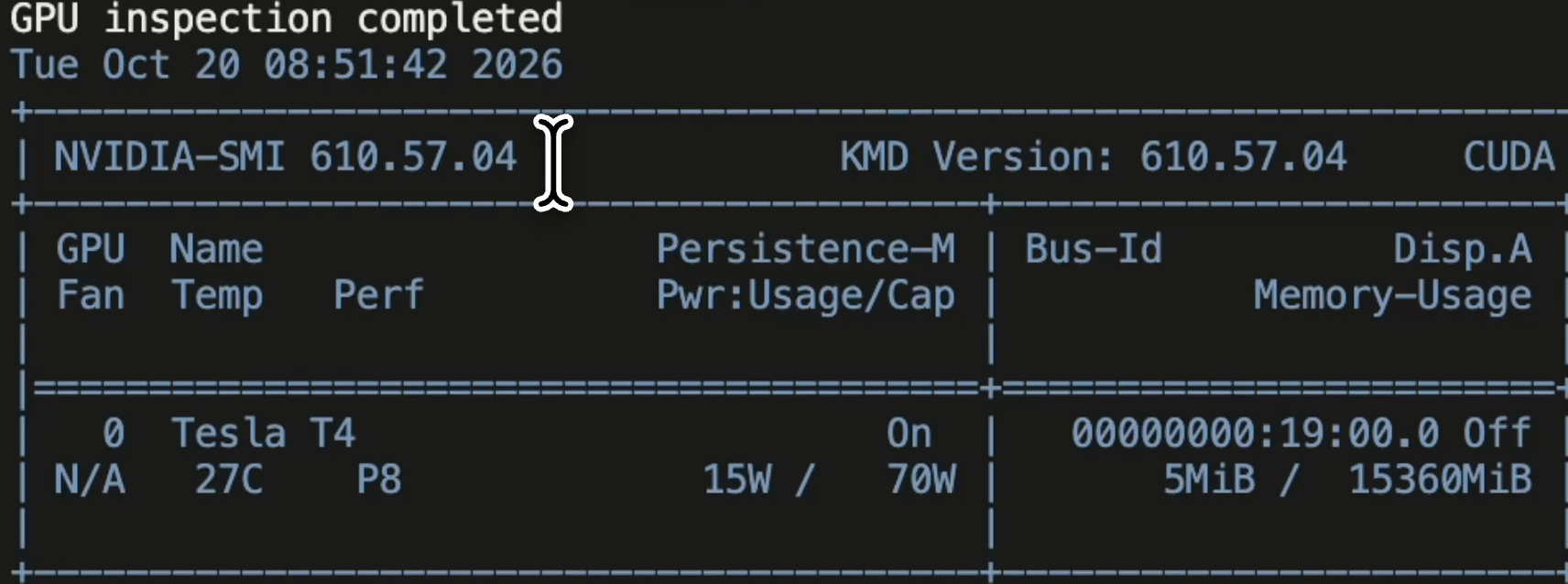
Before deploying the inference server, I ran a small remote CPU test and a GPU inspection.
The CPU test returned the square of 42: 1,764. The GPU test ran nvidia-smi and identified a Tesla T4 with 15,360 MiB of memory.
modal run modal_test.py --allow-cloud
modal run gpu_test.py --allow-cloud
These checks make the next failure easier to locate. Remote execution can work before the serving environment is correct. A GPU can be available before the model is loaded. I wanted to establish those stages separately.
▶ Watch the inspection (23:55)
The deployment configuration lives in qwen_vllm.py. The image pins vLLM 0.11.2 and uses Python 3.12. A persistent volume holds downloaded model files.
I configured a 2,048-token serving context, float16 execution, one maximum GPU container, and a 30-second idle scale-down window. The vLLM API exposes the model under the name domainos-qwen.
Those are choices for this small lab. The context limit bounds the request size. The container limit bounds the deployment's scale. The cache preserves model files between container lifetimes. Keeping files on a volume still leaves the server with work to do when a new container starts.
Deployment and readiness are different milestones
After authenticating the Modal CLI, I deployed the server:
modal deploy qwen_vllm.py
Modal returned an HTTPS server URL. The client needs that server address, rather than the browser address of the application's dashboard.
I stored it in ENDPOINT and ran the readiness check:
python3 readiness_test.py --allow-cloud --wait-ready --readiness-seconds 600
The cloud scripts require --allow-cloud because their requests can activate billed compute. Proxy credentials are entered through hidden prompts.
During startup, the endpoint returned HTTP 503. The client reported each attempt, the elapsed time and the next retry. It polled GET /v1/models until the expected model was available.
That gives the waiting period a useful meaning. The application can tell the difference between a model still starting, an authentication failure, and a server ready to accept a generation request.
It also keeps the operation controlled: readiness checks repeat; the chat request is submitted once after readiness succeeds.
Measure the wait and the answer separately
I then ran the cloud client:
python3 cloud_client.py --allow-cloud --wait-ready --readiness-seconds 600
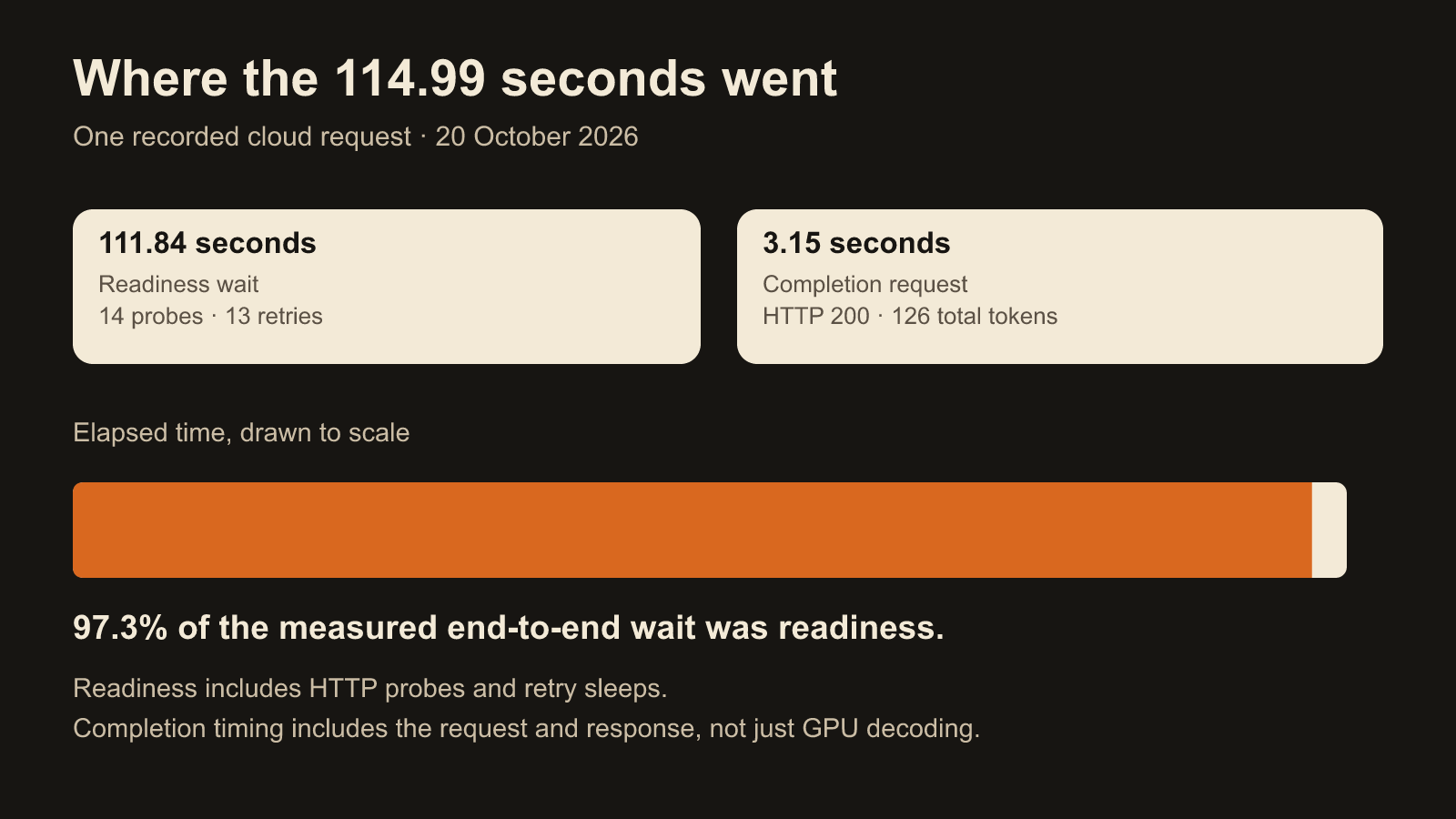
For the completion shown in the recording, the client made 14 readiness probes, with 13 retries. It reported a readiness wait of 111.84 seconds.
The subsequent chat-completion request returned HTTP 200 in 3.15 seconds. The total elapsed time was 114.99 seconds.
The response used 38 prompt tokens and 88 completion tokens: 126 tokens in total. Prompt tokens measure the input processed for the request; completion tokens measure the generated output.

▶ Watch the cloud response (33:00)
About 97.3% of the measured end-to-end time was spent waiting for readiness. That timer includes the HTTP probes and retry sleeps. The 3.15-second completion timer covers the request and response, including network and server work.
This is the practical tradeoff behind scaling to zero. Releasing idle compute helps control cost. The next request may have to wait for the server to start again.
For an interactive product, I would begin with the response-time requirement. How long can a person wait? How often will requests arrive? Does the workload justify keeping a container warm? A scheduled batch job and a customer-facing chat interface can make different choices while using the same model.
Test access in both directions
A successful request establishes the positive side: valid credentials reached the model and returned an answer.
I also ran the security check:
python3 security_test.py --allow-cloud
Requests with missing credentials returned HTTP 401. Requests with deliberately invalid credentials also returned HTTP 401.

Together, those results make the endpoint's access boundary visible. A customer service also needs customer-scoped authorization and isolation; those belong in the design around this serving path.
Read the bill for the work that ran
I inspected resource charges with:
modal billing report --for today --resolution h --show-resources
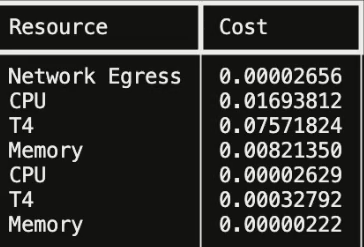
The seven captured rows covered the inference application and the separate GPU inspection. Summed by resource, they were:
| Resource | Cost in USD |
|---|---|
| T4 GPU | $0.07604616 |
| CPU | $0.01696441 |
| Memory | $0.00821572 |
| Network egress | $0.00002656 |
| Captured total | $0.10125285 |
That is approximately $0.10 for the displayed tutorial usage, including startup and testing. A cost per token or monthly service price needs a workload measured over a matching billing window.
▶ Watch the cost review (36:00)
After a lab session, the explicit stop command is:
modal app stop domainos-qwen-vllm-lab
That closes the loop: deploy, call, inspect, account for usage, and stop when the session is finished.
What this changes about the next build
I now have a serving path I can inspect from the application to the GPU and back. The Python client can distinguish readiness from generation. The endpoint accepts valid credentials and rejects the tested negative cases. The billing report gives the experiment a concrete resource cost.
The next questions become more specific. Which model meets the application's task? What response time does the user need? What context should accompany a request? How will I measure answer quality, load and ongoing cost?
For a finance-operations application, a fast response would still need the right records, domain rules and evaluation. Hosting the model creates the place where that application can call it. The application has to define useful work.
That is why I think this is a worthwhile small project. It takes deployment out of the abstract. You get an endpoint, a client, a waiting period, a response, an access check and a bill. Each gives you something concrete to improve.
The full tutorial follows the build on screen. The GitHub repository contains the deployment, clients, readiness checks and setup instructions.
If your team has an open-weight model and needs help turning it into an API in its own cloud account, my managed inference services cover assessment, deployment and ongoing management.
For your own project, which constraint comes first: response time, model quality, control over the deployment, or the cost of keeping it available?
New tutorials every Wednesday and Saturday.
Subscribe on YouTube for the videos, or on Substack for the written versions.